Key Takeaways
- A physical therapy condition specific resource section groups patient education by diagnosis and treatment area, so a patient reading about knee pain lands in a knee library instead of a date-sorted blog feed.
- Pew Research Center’s 2013 Health Online study found 77% of online health seekers began at a search engine, so many patients arrive through a condition question, not your homepage.
- Nielsen Norman Group’s Jakob Nielsen wrote in 2011 that users often leave web pages in 10–20 seconds, so the right condition path has to be obvious.
- Content Marketing Institute’s B2B trends research for 2026, published in October 2025, found 97% of marketers have a content strategy — having content is common, and the improvers credit refining the strategy.
- A physical therapy condition specific resource section produces evaluations only when each condition hub connects to a condition page, a booking path, and your Google Business Profile.
- The physical therapy condition specific resource section is a maintained asset: quarterly reviews, clinician sign-off, and retiring outdated articles keep it trustworthy.
Why a Physical Therapy Condition Specific Resource Section Beats a Chronological Blog
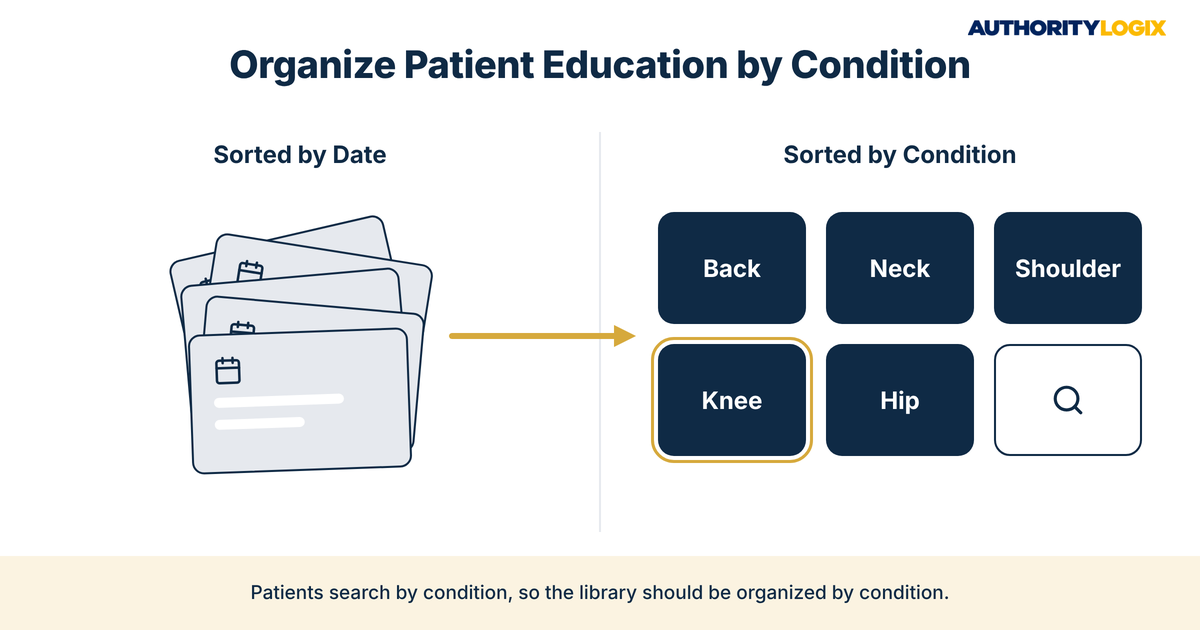
A physical therapy condition specific resource section is what turns years of patient education into something a prospective patient can actually find. Your clinicians explain the same things every week, from rotator cuff questions to what the first visit looks like after a knee replacement. Most practices that publish that knowledge drop it into a blog sorted by date, which the
content SEO playbook treats as a starting point rather than a finished library.
That is the credible but invisible problem on a single page. The expertise is real, but a patient who lands on an old post about sciatica sees no path to the rest of your back pain education and no reason to stay. A physical therapy condition specific resource section fixes the structure instead of asking your team for more posts.
Patients search by problem, not by publishing date. Pew Research Center’s 2013 Health Online study found that 72% of internet users had looked online for health information within the past year, and 77% of those online health seekers began at a search engine such as Google, Bing, or Yahoo. They type a condition or a body part, and the page they land on has to prove depth on that condition.
A chronological blog fails that test by design. Posts about knees, backs, and shoulders sit side by side in date order, and older articles sink deep into the archive. When publishing runs through dedicated
content systems, every new article is assigned to a condition before it is written, so the physical therapy condition specific resource section grows in the shape patients search.
A physical therapy condition specific resource section also tells search engines what your practice treats. A cluster of linked pages on low back pain, sciatica, and lifting strains reads as depth on back conditions, while twelve unrelated posts read as a newsletter archive. That signal sits underneath the work described on the
PT industry hub, where content, local search, and lead generation operate as one connected system.
The Physical Therapy Patient Education & Clinical Authority Guide shows how condition-level education builds the clinical trust a physical therapy condition specific resource section is designed to earn.
Clinical Authority Guide →
Mapping a PT Educational Hub by Condition: Back, Neck, Shoulder, Knee and Beyond
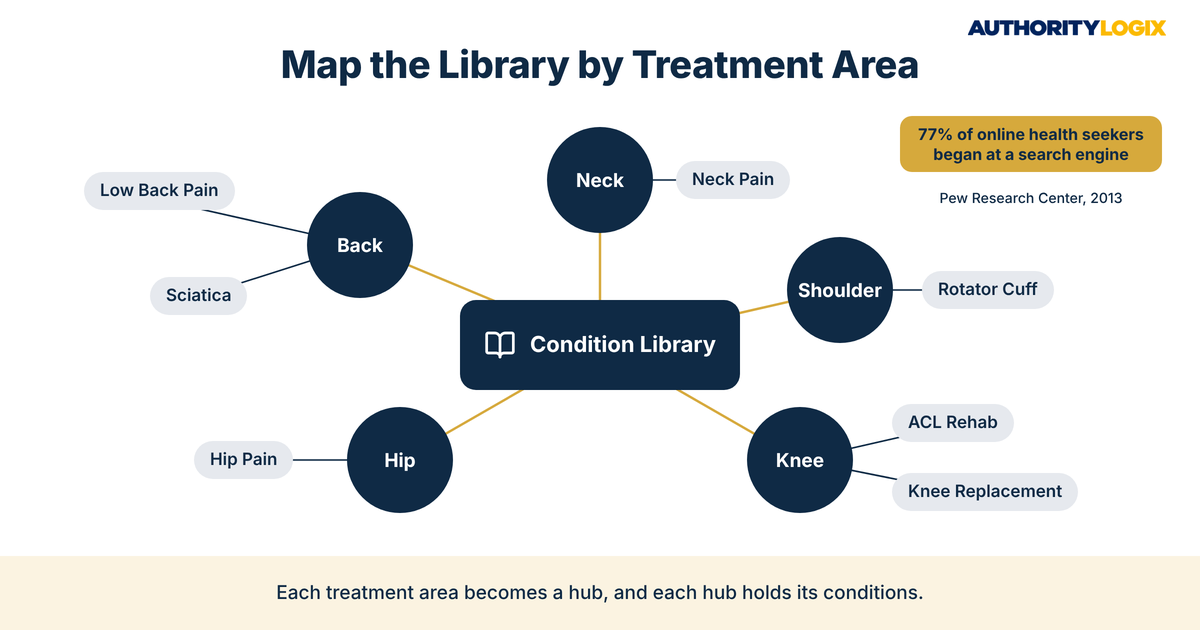
Mapping starts with your caseload, not a keyword tool. List the conditions your clinicians evaluate most often, then group them under the body region a patient would name. A PT educational hub by condition usually begins with four or five treatment areas — back, neck, shoulder, knee, and hip — plus one or two specialties such as sports injuries or post-surgical rehab.
Each treatment area becomes a hub, and each hub holds the conditions inside it. The back hub covers low back pain, sciatica, and disc questions, and the knee hub covers ACL rehab, meniscus questions, and life after a knee replacement. Designing that map is the first step of any
educational hub build, because the map decides every page that follows.
Choosing Treatment Areas for a Physical Therapy Condition Specific Resource Section
Pick treatment areas the way patients describe their problem — nobody searches for a lumbar spine category. Keep the top level to six areas or fewer so a patient can scan the whole physical therapy condition specific resource section menu at a glance, and push specialty conditions one level down.
Every hub follows the same pattern. Each treatment area in a physical therapy condition specific resource section needs five elements:
- A plain-language overview of the body region and the conditions grouped under it
- Links to every condition article in that area, in a deliberate reading order
- A short clinician introduction naming who on your team treats that area
- Answers to the questions patients ask most before a first visit
- A clear next step — a condition page or an evaluation request
Practices with an existing article archive are not starting over. Older posts can be re-sorted into treatment areas, each assigned to one hub and rewritten where it overlaps another, a process covered in more detail in the guide to building an
education library. The PT educational hub by condition is a re-architecture project first and a writing project second.
Physical Therapy Diagnosis Content Organization: Categories, Pillars and Supporting Articles
Physical therapy diagnosis content organization works in three levels. Treatment areas sit at the top, a pillar page for each condition sits in the middle, and supporting articles answer narrower questions underneath. It is the same architecture described in the guide to
pillar pages and topic clusters, applied to diagnoses instead of marketing topics.
| Level |
What It Covers |
Example in the Back Hub |
Links To |
| Treatment area hub |
One body region and every condition inside it — the top level of the physical therapy condition specific resource section |
Back pain and spine |
Every condition pillar in the area |
| Condition pillar |
One diagnosis explained in depth, in plain language |
Sciatica |
Its hub, its supporting articles, and its condition page |
| Supporting article |
One narrow question a patient asks |
What to expect at a first visit for sciatica |
Its pillar and one related article |
| Condition page |
The service page where a patient requests an evaluation |
Sciatica physical therapy at your clinic |
The booking path and the matching pillar |
The links run in both directions. Every supporting article links up to its pillar, every pillar links up to its hub and across to related conditions, and nothing in the physical therapy condition specific resource section is left as an orphan. Search engines read that pattern as topical depth, and patients read it as thoroughness.
Who Writes and Signs Off on Each Condition Pillar
In a physical therapy condition specific resource section, the author line matters. Each pillar should name the clinician who reviewed it, list credentials, and show a review date. The writing stays educational — what the condition is, how a physical therapy evaluation works, what questions to bring — and never promises a recovery timeline or an outcome.
A fixed production sequence keeps that standard intact as the library grows. That sequence is part of
how we build every library: the map and the pillar pages come first, and supporting articles follow in batches, so physical therapy diagnosis content organization is settled before volume arrives. Adding articles to an unsettled structure is how a resource section slides back into a blog.
Not sure whether your current blog can become a physical therapy condition specific resource section? The PT Authority Gap Assessment shows which conditions you cover, which you miss, and what to build first.
Authority Gap Assessment →
Designing a PT Treatment Area Resource Library Patients Can Navigate in Seconds
Navigation is where most resource sections lose the patient. Nielsen Norman Group’s Jakob Nielsen wrote in 2011 that users often leave web pages in 10–20 seconds, and that the first 10 seconds of a visit are critical to the decision to stay or leave. A PT treatment area resource library has only a few seconds to show a patient with a sore shoulder exactly where the shoulder content lives.
The landing page of the physical therapy condition specific resource section has three jobs. It shows the treatment areas as large, labeled tiles, it offers a search box for patients who already know their diagnosis, and it surfaces the most-read condition in each area. Publication dates and tag clouds move out of the way.
Navigation Elements That Keep Patients Moving
The details are small but consistent. Every page in a PT treatment area resource library should carry the same navigation elements:
- Treatment area tiles labeled in patient language: Back, Neck, Shoulder, Knee, Hip
- A breadcrumb on every article showing the hub, then the condition
- A related conditions block at the end of each pillar
- A visible clinician byline and review date near the top
- One consistent call to action per page that points to the condition page
This article sits inside a
resource library organized the same way — by category rather than by date — so a reader can move from one related topic to the next without hunting. Your patients deserve the same courtesy from your physical therapy condition specific resource section.
Design choices like these come from building libraries. BKDSCR.com, the AuthorityLogix proof-of-concept build in the NYC outer-borough DSCR real estate niche, is built on 18 pillar pages and 48 SEO-optimized blog posts organized around the searches its investors run, and it generates inbound leads with zero paid ads. That structural discipline is the center of
our approach, applied to the conditions your clinicians treat.

Connecting the Physical Therapy Condition Specific Resource Section to Condition Pages, Bookings and the Map Pack
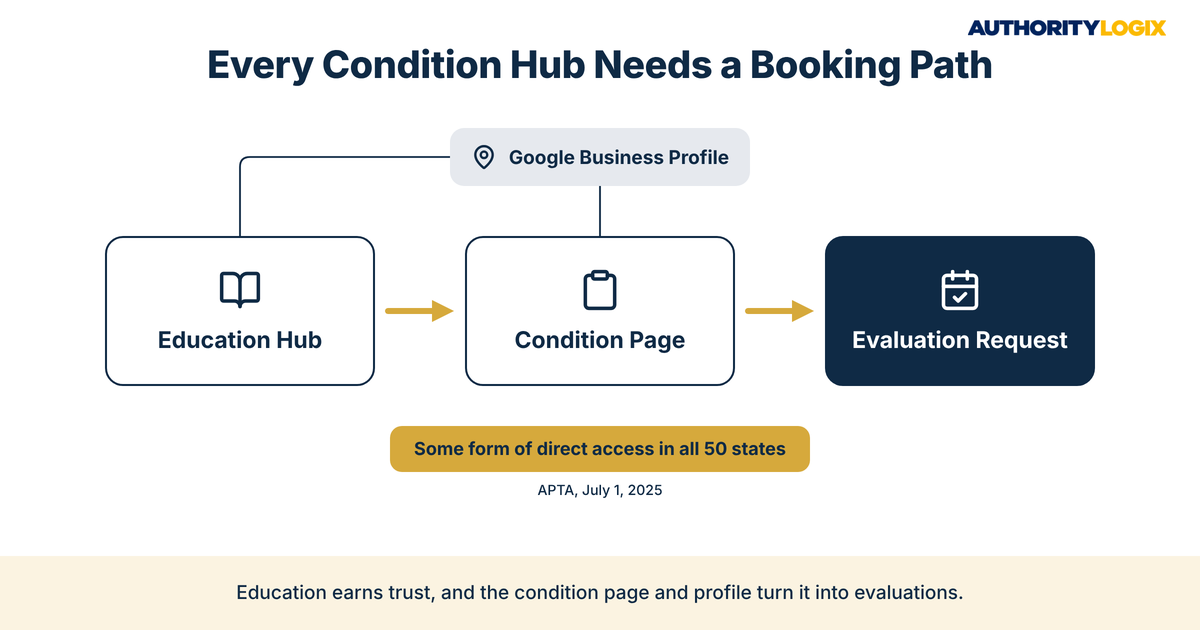
Education that never connects to a booking path is a library with no front desk. Each condition pillar in the physical therapy condition specific resource section should link to its matching condition page, where the patient sees which clinicians treat it and how to request a visit. The route from first search to first evaluation is laid out in the
acquisition playbook.
Direct access raises the stakes. According to the American Physical Therapy Association, all 50 states, the District of Columbia, and the U.S. Virgin Islands have either provisional or unrestricted direct access as of July 1, 2025, so a patient reading your knee content may be able to book without a physician referral first. Rules differ by state, so the condition page is where your clinic explains its own intake.
Local search is the other connection. A local search for knee pain can surface your Google Business Profile, a condition page, or an education article, and each one should point to the others. The
local visibility guide covers how profile categories, services, and posts reinforce the pages on your site.
When the profile, the condition pages, and the education hubs all name the same treatment areas, the signals line up. Building that alignment is the job of
local search infrastructure, and it is what lets a physical therapy condition specific resource section support visibility well beyond the article a patient happens to open first.
What Most PT Practices Get Wrong When Organizing Patient Education
Most practices that struggle here are not short on knowledge. In Content Marketing Institute’s
trends research, published in October 2025 and based on 1,015 B2B marketers, 97% said they have a content strategy, and the biggest driver of improvement was strategy refinement, cited by 74% of the marketers whose strategy improved. Those are B2B marketers rather than clinics, but the lesson carries: having content is common, and refinement is what the improvers credit.
For a physical therapy practice, refinement usually starts with structure. The questions below are the ones practice owners and prospective patients raise most often when a blog is turned into a physical therapy condition specific resource section.
Can we just add categories to our existing blog?
A category page that lists posts by date is still a blog with labels. A physical therapy condition specific resource section needs hub pages with written overviews, a deliberate reading order, and links between related conditions.
How many conditions should we cover in the first build?
Start with the conditions your clinicians evaluate most and the ones you most want to grow. Four or five treatment areas with two or three strong pillars each is a sounder start than twenty thin pages, and every pillar should hand the reader to the
lead generation path on its matching condition page. Breadth can come later, once the structure holds.
Will patients actually read long condition articles?
Patients read what answers their question, and length works only when the page is organized. Clear headings, a short summary, and links to narrower articles let each patient take the depth they need.
Should the front desk or the clinicians own this?
Clinicians own the knowledge, and someone else should own the system. A busy therapist will review a pillar draft but will not maintain hub pages and links. That split — your clinical expertise, an outside build — is
what we do for practices that are respected in their community but missing from its search results.
Does a condition library replace physician referrals?
No, and it should not try to. A physical therapy condition specific resource section adds a second source of patients alongside referrals, which matters because of a familiar risk: one referring doctor retires and the pipeline dries up overnight. Education patients find on their own spreads that risk across many searches.
Ready to turn your clinicians’ patient education into a condition-by-condition education hub where every diagnosis leads to a booking path?
Work With Us →
The Honest Maintenance Plan: Keeping the Library Current
A physical therapy condition specific resource section is not finished at launch. Your clinic adds services, and older articles start to read their age. The honest plan is a quarterly review: each hub checked for broken links, each pillar re-read by a clinician, and any article that no longer reflects how your practice works either updated or retired.
Maintenance is also where a physical therapy condition specific resource section starts to compound. Each new supporting article slots into an existing hub instead of floating alone, and the
growth blueprint explains how structured visibility of this kind becomes a practice asset over years rather than months.
Distribution extends the reach of every pillar. A condition pillar can be summarized for a newsletter or shared with referring providers, which is the role of
authority distribution once the library exists. Each mention points back to the physical therapy condition specific resource section rather than to a one-off post.
The honest answer is that most physical therapy practices already have the knowledge patients are searching for. What is missing is a structure that lets a patient find the right condition quickly and a path that turns that reading into an evaluation. Build the map first, and every article after it has somewhere to live.