


Key Takeaways
- A Google Posts physical therapy practice plan keeps your Business Profile current during the weeks between a patient’s first search and the day they book an evaluation.
- Google archives posts older than 6 months unless a date range is set, so a profile that stops posting slowly goes quiet on Search and Maps.
- BrightLocal’s 2026 survey found 74% of consumers seek reviews written in the last three months, so searchers judge a profile by how recent its activity looks.
- Whitespark’s 2026 Local Search Ranking Factors puts frequency of Google Posts at 148th for the local pack, so posts support trust and conversion more than rankings.
- PT Google Business Profile posts work when they answer a patient question, point to one booking action, and come from the same content system that feeds your website.
- A Google Posts physical therapy practice schedule is infrastructure, not a campaign: steady, purposeful, and measured by calls and bookings.
Table of Contents
Why a Google Posts Physical Therapy Practice Plan Keeps You Visible Between Visits
A Google Posts physical therapy practice plan solves a problem most clinic owners never see on their own dashboards: the long gap between the day a prospective patient first notices your clinic and the day they finally book. Your therapists may hold doctorates and specialty certifications your referring physicians respect — and the Business Profile still looks like it was last touched when the sign went up. That is the credible but invisible gap, and the AuthorityLogix PT industry hub is organized around closing it with systems instead of one-off tactics.
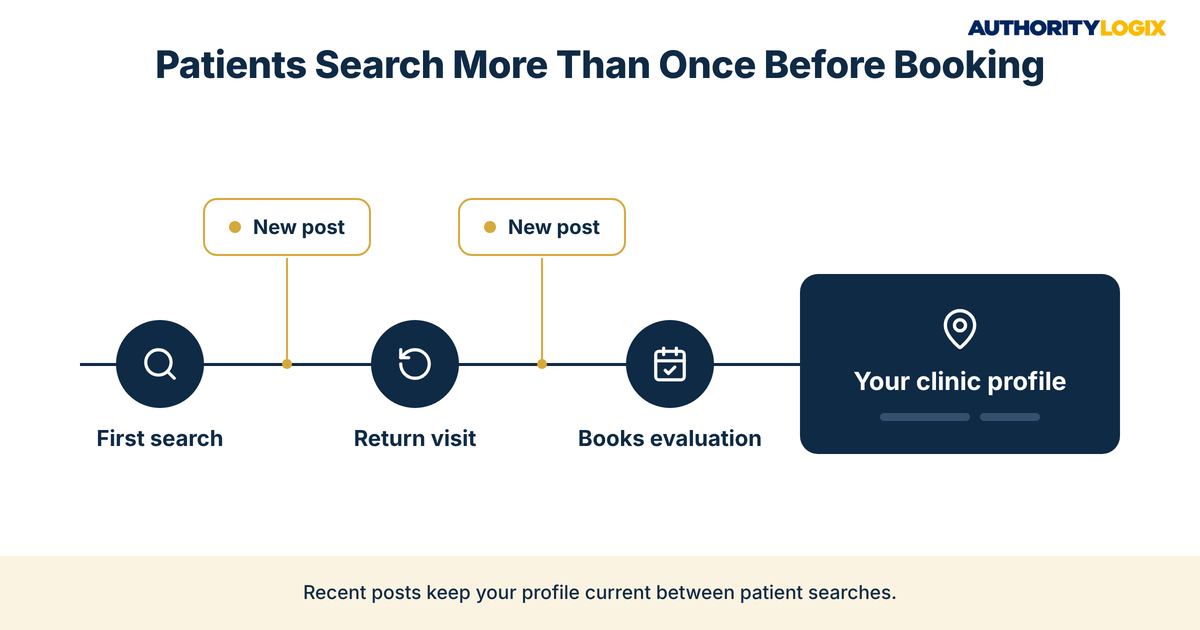
Patients rarely book on the first search. Someone with a nagging shoulder looks up clinics, waits a week, then searches again. Each return visit is a chance for your profile to look active or stale, and a Google Posts physical therapy practice routine is one of the few profile elements you control completely — which is why it belongs in the patient pipeline the acquisition playbook maps from first search to first evaluation.
Recency is what local searchers scan for. The 2026 BrightLocal survey of local consumers, published in February 2026, found that 97% of consumers read reviews for local businesses and 74% seek reviews written in the last three months. That finding is about reviews, not posts, but it shows how searchers judge a profile: recent activity reads as a clinic that is open, busy, and paying attention. A Google Posts physical therapy practice plan adds a second visible layer of recent activity next to your reviews.
Posts sit on top of the map pack work, not in place of it. Categories, proximity, hours, and reviews decide whether your clinic appears; posts shape what a patient sees once it does. Treated as one piece of a local search program — profile, reviews, citations, and location pages together — a Google Posts physical therapy practice plan earns its place. Treated as a standalone chore, it is the first task dropped in a busy month.
The Physical Therapy Local Visibility Guide shows where a Google Posts physical therapy practice plan fits inside the full local system — the profile, map pack signals, reviews, and location pages that put your clinic in front of nearby patients.
What PT Google Business Profile Posts Should Actually Say
Most PT Google Business Profile posts fail because they say nothing a patient needs. A holiday greeting over a stock photo does not answer what a searcher is asking: can this clinic help with my problem, and how soon can I get in. Google’s Business Profile help documentation lists three post types — updates, offers, and events — and every Google Posts physical therapy practice update should carry a specific message and one next step.
| Post Type | What Google Requires or Allows | What a PT Practice Can Post |
|---|---|---|
| Update | Business information, a photo or video, and an optional action button | New evening hours, a clinician introduction, a direct-access answer |
| Offer | A title, dates, and times, with an automatic “View Offer” button | Use sparingly, only where payer contracts and state rules allow |
| Event | A title, start and end dates, and times | A community injury-prevention talk or a running club workshop |
Posting on top of an incomplete listing wastes the effort, which is why profile optimization comes first: the right primary category, services listed by name, accurate hours, and a booking link that works. Get that foundation right once, and every Google Posts physical therapy practice update after it has somewhere useful to send people.
Four Message Types a Google Posts Physical Therapy Practice Plan Should Rotate
- Access posts — new hours, evaluation openings, a new location, direct-access information
- People posts — a clinician introduction with credentials and the conditions they focus on
- Education posts — a short answer to a front-desk question, linked to the full page
- Community posts — workshops, club partnerships, and local events
Writing posts from scratch every week is where most clinics stall. When a Google Posts physical therapy practice plan runs off a content system — where each new condition page or FAQ answer produces a short profile version — the supply never depends on someone remembering on a Friday afternoon. Keep every post educational, and leave outcome promises and recovery timelines out entirely.
Google’s own rules point the same way. Its guidance warns businesses in regulated industries, including health and medical devices, not to post content about those regulated products, and notes that posts with a phone number in the description might be rejected if the number cannot be verified. Write about services, people, and schedules, and let the action button handle the call.

Building a Physical Therapy GBP Content Strategy Around Evaluation Bookings
A physical therapy GBP content strategy starts from the booking, not the post. Decide what a patient should do after reading — book an evaluation, call, read a condition page — and write backward from that action. Google lets update and event posts carry an action button, so each Google Posts physical therapy practice post can point somewhere specific.
Matching Posts to the Patient’s Decision Stage
Patients move through recognizable stages: noticing a problem, learning what physical therapy can do for it, comparing clinics, and booking. Education posts serve the early stages when they link to a full answer, and an educational hub of condition and FAQ pages gives each post a real destination. A two-sentence post about what a first evaluation involves, linked to the page that explains it, outworks a dozen generic updates.
The comparison stage is where people posts matter most. A patient choosing between two clinics wants to know who will treat them and what training that person has. The clinical authority guide covers how credentials and clinician bios build that trust across your site, and a physical therapy GBP content strategy carries the same signals onto the profile patients see first.
The booking stage needs the least creativity and the most accuracy. Access posts about openings, hours, and locations should be current and paired with a booking button that works on a phone. Built this way, a Google Posts physical therapy practice plan stops being a weekly chore and becomes a quiet extension of your scheduling desk.
Not sure where your profile stands on posts, reviews, and booking paths? The PT Authority Gap Assessment shows which local signals are weakest for your clinic and what to build first.
How Often a Google Posts Physical Therapy Practice Schedule Should Run
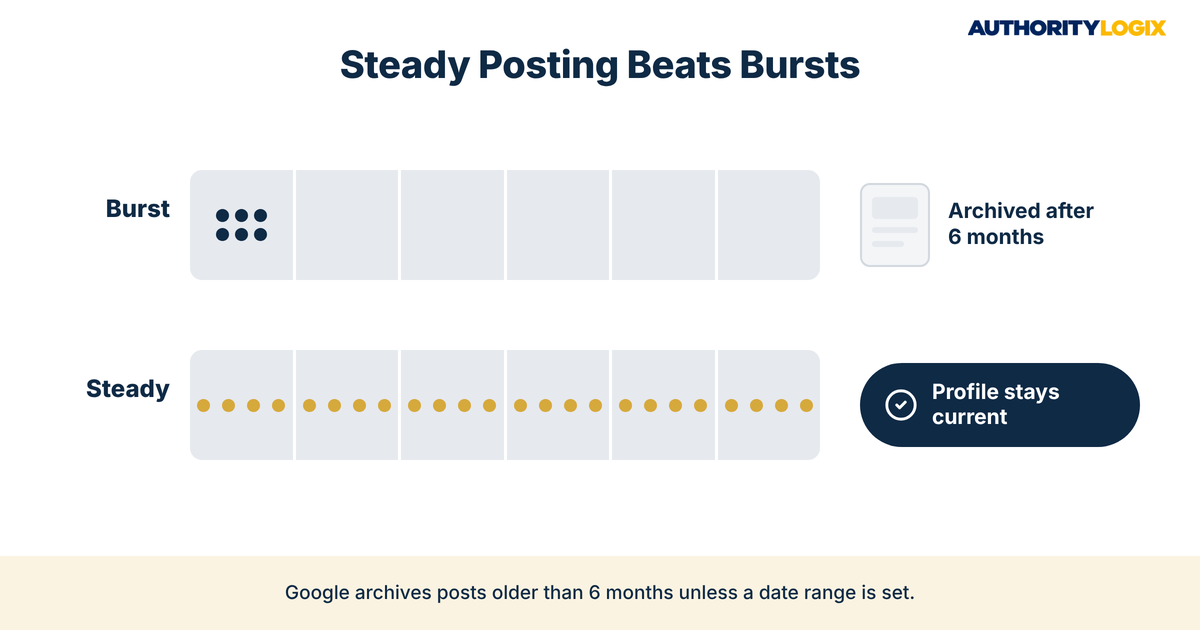
The honest answer on frequency is that consistency matters more than volume. Google states that posts older than 6 months are archived unless a date range is set, so a clinic that posts heavily in January and then stops will have a quiet profile by summer. A Google Posts physical therapy practice schedule built around one purposeful post a week is sustainable for most clinics and keeps the profile visibly current without turning into filler.
That rhythm holds only when posts are planned alongside everything else you publish. A shared publishing schedule lets the profile follow the website — a new condition page on Tuesday becomes an education post on Thursday. Google also lets you schedule posts ahead or set them to repeat, which keeps a Google Posts physical therapy practice schedule running through holidays and short-staffed weeks.
Purpose decides what goes into each slot. Posting the same message weekly with a new photo is the volume myth in miniature. The content SEO playbook explains how topics are chosen around what patients actually search, and the same topic map should drive the Google Posts physical therapy practice schedule: each post ties to a service, a condition, or a question your community asks.
Every post also needs a landing spot that captures the visit. When the button opens a page with a short evaluation request form or online scheduling, the post becomes part of your lead generation infrastructure. Without that capture step, even a strong Google Posts physical therapy practice post leaves the patient one tap from the search results.
Tracking PT Google Posts Visibility in the Map Pack
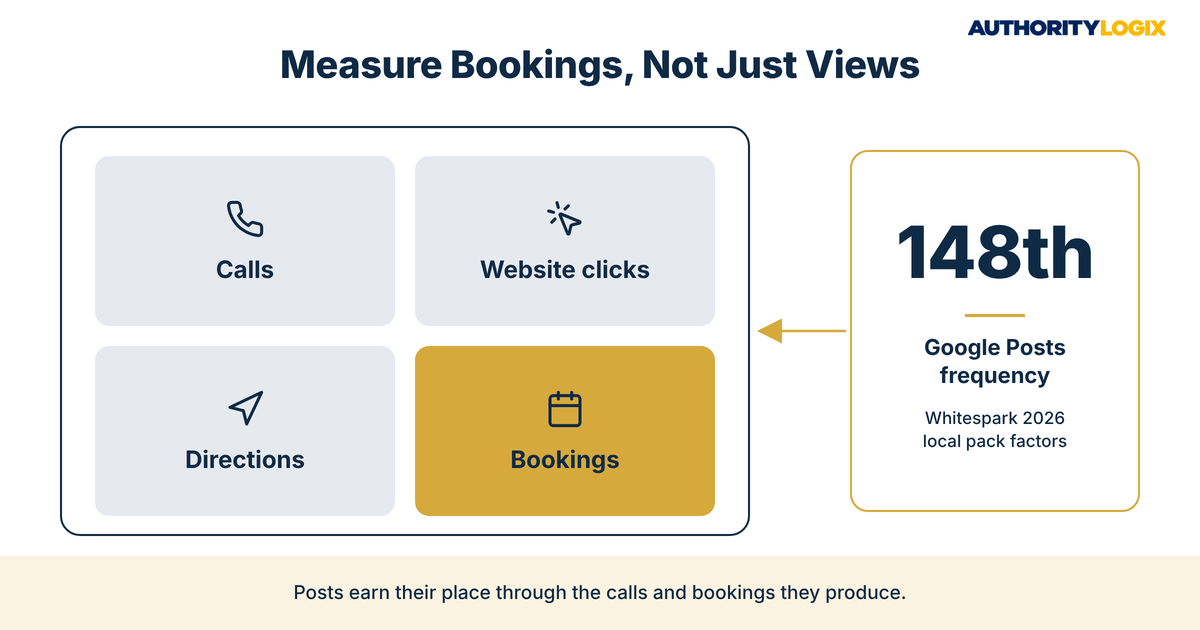
PT Google Posts visibility is easy to overstate, so start with the ranking research. Whitespark’s 2026 Local Search Ranking Factors, written by Darren Shaw with input from 47 local search experts, ranked primary Google Business Profile category as the number one local pack factor. Frequency of Google Posts or updates landed at 148th on the same list, so a Google Posts physical therapy practice plan is not a ranking lever.
What posts do is shape what a patient sees after your clinic appears. They show in the updates or overview tabs on mobile and in the “From the owner” section on desktop, on both Search and Maps. That makes them a trust asset, so judge PT Google Posts visibility in the profile performance report, not a ranking tracker.
| What to Track | Where It Comes From | What It Tells a PT Practice |
|---|---|---|
| Calls | Business Profile performance report | Whether profile visitors are reaching the front desk |
| Website clicks | Business Profile performance report | Whether posts and the profile send patients to your pages |
| Bookings | Business Profile performance report, where it applies | Whether the scheduling path is being used |
| Directions | Business Profile performance report | Whether nearby patients are planning a visit |
| Post button clicks | A tracking tag on each post link, read in your site analytics | Which Google Posts physical therapy practice topics produce visits |
Reading the Numbers Without Fooling Yourself
Compare month against month, not post against post, because one post rarely moves the totals. Tag each post link so your analytics can separate post traffic from other profile clicks, then see which Google Posts physical therapy practice topics produce booking-page visits. Posts that earn nothing for three months get rewritten or retired.
Posts travel further when the same message is distributed elsewhere. A clinician introduction on the profile, your website, and your professional channels tells one consistent story, which is the job of authority distribution across a local market. Each placement makes the others more believable to the patient comparing clinics.
The material for those posts should already exist. Clinics that build a resource library of condition explanations and FAQ answers never run short of topics, because every page can become a post that links back. That is how PT Google Posts visibility becomes a by-product of work you are already doing.
What Most PT Practices Get Wrong With Google Posts: Questions Patients Ask
Most clinics that give up on a Google Posts physical therapy practice plan were never short on effort. They were working from wrong assumptions about what posts do, who reads them, and what is allowed.
Do patients actually see Google Posts before they book?
Posts appear on the profile itself, in the updates or overview tabs on mobile and the owner section on desktop. A patient comparing clinics on a phone often scrolls past them on the way to reviews, so a clear first line matters more than length.
Will posting every day push our clinic up the map pack?
Daily posting is unlikely to change your position. Whitespark’s 2026 survey ranked posting frequency well below categories, proximity, and reviews, so a Google Posts physical therapy practice plan should be judged on calls and bookings, not rank.
Can we share patient success stories in a post?
Keep identifiable patient details out of posts entirely, including names, photos, and specifics that could point to a person. Write about the problems your clinicians focus on, and avoid wording that promises a result.
Who should write our posts — the front desk or the therapists?
Therapists should supply the expertise and someone else should own the system, because a clinician with a full caseload will not write, schedule, and track posts every week. That split — your clinical knowledge, an outside build — is what we do for practices that are respected locally but thin on their own profile.
How do posts fit into long-term growth?
Posts are a small, steady signal inside a larger system. The growth blueprint shows how profile activity, location pages, and reputation stack into a practice that depends less on any single referral source. One referring doctor retires and the pipeline dries up overnight; a profile that patients find and trust on their own is part of the protection against that.
Want a Google Posts physical therapy practice system that publishes every week, points each post to a booking path, and reports the calls it produces? Let’s build it around your clinic.
The Honest Truth About Google Posts and Your Patient Pipeline
A Google Posts physical therapy practice plan will not rescue a clinic with an incomplete profile, thin reviews, or no location pages. It will not replace physician referrals or guarantee a single new evaluation. What it does is keep the profile current, answer patient questions at the moment of comparison, and give every return visit a reason to move toward booking.
The order matters more than the effort. Profile first, then the pages posts link to, then a steady schedule tied to a measurement routine — the sequence laid out in how we build puts the foundation in place before the weekly rhythm starts. A Google Posts physical therapy practice plan built in that order compounds; one built in reverse fizzles by spring.
AuthorityLogix runs the same approach on its own proof-of-concept. BKDSCR.com, built in the NYC outer-borough DSCR real estate niche, runs on 18 pillar pages, 7 interactive investor tools, and 48 SEO-optimized blog posts with zero paid ads — a working example of why AuthorityLogix talks about connected systems instead of isolated tactics. The market is different; the infrastructure logic is the same.
The honest answer is that most physical therapy practices already have the expertise patients are searching for. What is missing is the infrastructure that makes it visible between visits, and a Google Posts physical therapy practice plan is one small, dependable piece of it. Build the piece properly, connect it to the rest, and let it run.