Key Takeaways
- Physical therapy website structure is the foundation that determines whether a PT practice’s content earns rankings, passes link equity to the right pages, and guides patients from first search to booked evaluation — or loses them at every step.
- Many web pages receive few or no internal links, making them hard for search engines to discover. For PT practices, orphaned service pages and condition pages are the most common structural failure — and the most avoidable.
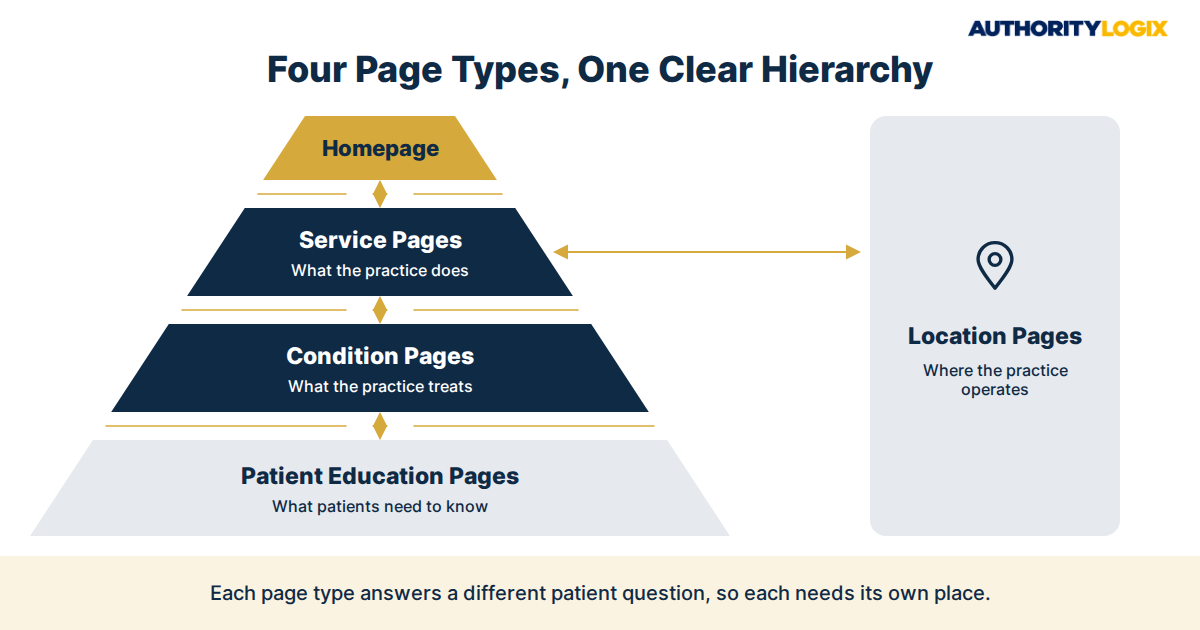
- Every PT website requires four distinct page types organized in a clear hierarchy: service pages (what the practice does), condition pages (what the practice treats), location pages (where the practice operates), and patient education pages (what patients need to know). Each page type serves different patient search intent and requires different content.
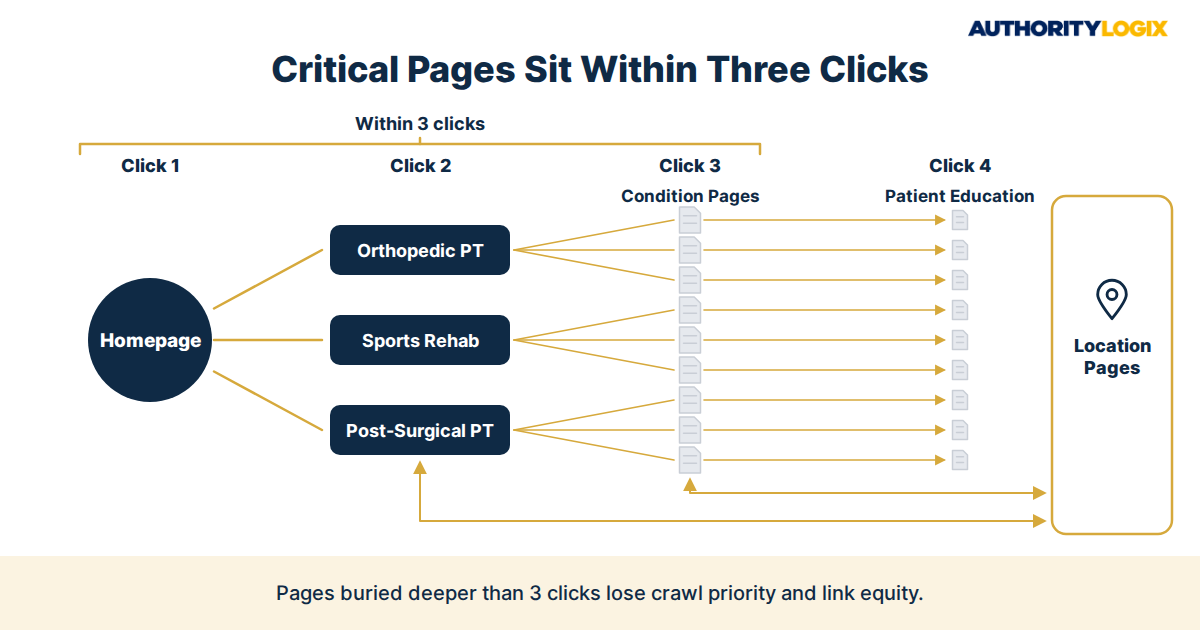
- The three-click rule governs every critical page: every service page, condition page, and location page should be reachable in no more than 3 clicks from the homepage. Pages buried deeper lose crawl priority and link equity from search engines.
- Many patients prefer providers offering online booking — yet a relatively small share of healthcare appointments are scheduled online. Website structure that buries booking behind multiple navigation layers is the primary reason this gap exists.
- PT practices that organize service and condition pages into a pillar-cluster architecture — with a broad service category pillar page linking to specific condition cluster pages — build the topical authority signal Google’s Helpful Content system requires to rank YMYL healthcare content.
- Internal link architecture is not secondary to content — it IS content strategy. How pages connect determines what Google understands about topical relationships, which pages accumulate authority, and which pages a patient can actually find during a pre-booking research session.
Physical therapy website structure is the architecture that decides whether a practice’s pages rank individually, compound in authority over time, and guide patients through the decision process — or sit in isolation, competing against each other and losing to better-organized competitors. Most PT websites are built page by page, as needs arise, without a governing architecture.
The result is a site with no clear hierarchy, orphaned condition pages that Google cannot connect to a topical authority signal, location pages that compete with each other for the same search terms, and patient education content that earns no link equity from the pages it supports. Fixing this does not require rebuilding — it requires understanding the structural logic that makes a PT website a patient acquisition machine.
This article covers the complete physical therapy website structure framework: the four page types every PT site requires, the hierarchy that connects them, the internal linking architecture that distributes authority, and the navigation and URL patterns that make the structure legible to both patients and search engines. The content playbook covers the content strategy that populates this structure — this article focuses specifically on the architecture that makes that content findable and rankable.
The 4 Page Types Every Physical Therapy Website Structure Requires
A functional physical therapy website structure is built from four distinct page types, each serving a different search intent and a different stage of the patient’s research process. Most PT websites have some version of all four — but without deliberate hierarchy and internal linking connecting them, the four page types operate as separate silos rather than a compounding authority system.
Physical Therapy Website Structure Page Type 1: Service Pages — What the Practice Does
Service pages describe the practice’s clinical specializations — the broad categories of care it provides. For most PT practices, core service pages cover: orthopedic physical therapy, sports rehabilitation, post-surgical recovery, neurological rehabilitation, pelvic floor therapy, pediatric PT, and vestibular rehabilitation. Each service page is a broad category page — not a specific condition page — and it functions as a pillar in the content hierarchy, linking down to the specific condition pages that fall within its category.
Service pages target broad service-level keywords: ‘orthopedic physical therapy [city],’ ‘sports rehab near me,’ ‘post-surgical PT [neighborhood].’ They earn rankings for mid-funnel searches from patients who know they need PT but are still selecting a specialty. The
educational hub is the operational framework that organizes service pages into a patient-navigable knowledge system — turning a list of services into a permanent patient education resource.
2. Condition Pages — What the Practice Treats
Condition pages are the highest-converting pages on a PT website. They target the specific condition-plus-location searches that high-intent patients use when they know their diagnosis and are selecting a provider: ‘physical therapy for rotator cuff injury [city],’ ‘frozen shoulder PT near me,’ ‘ACL recovery physical therapy [neighborhood].’ Each condition page covers one specific condition — its causes, how PT addresses it, what treatment involves, and expected recovery timeline.
Condition pages live below service pages in the hierarchy: the orthopedic PT service page links to rotator cuff, shoulder impingement, frozen shoulder, and AC joint condition pages. Condition pages link back to their parent service page and laterally to directly related condition pages. The
keyword guide covers the specific keyword targeting approach for condition pages — including how to identify the exact search terms patients in a given local market use for each condition.
3. Location Pages — Where the Practice Operates
Location pages serve two functions: they carry the geographic signals that drive local search rankings, and they provide location-specific information that patients need when selecting a convenient clinic. Every physical location requires its own dedicated location page — never consolidated, never templated with only a city name swapped. Each location page targets a distinct, non-overlapping set of geographic keywords tied to that clinic’s city, neighborhood, and surrounding area.
Location pages link up to the practice homepage and service pages, and link down to the condition pages most relevant to the patient population at that location. The
visibility guide covers the full local search optimization system that location pages operate within — including GBP alignment, NAP consistency, and review strategy that reinforce each location page’s geographic authority signal.
4. Patient Education Pages — What Patients Need to Know
Patient education pages serve the informational searches patients perform before they are ready to book: ‘do I need a referral for physical therapy,’ ‘what happens at a first PT evaluation,’ ‘how long does PT for a knee replacement take.’ These pages build the E-E-A-T signals Google’s YMYL evaluation requires for healthcare content, and they earn AI Overview citations for the question-format queries that dominate healthcare search in 2026.
Patient education pages live at the bottom of the site hierarchy — they link back to the relevant condition or service page, and up to the pillar that covers the topic they address. The
authority guide covers the patient education content strategy in full — including the question categories and writing structure that earn AI Overview citations.
The Physical Therapy Content SEO Playbook covers how site structure, topic clusters, and internal links work together so every page supports the next.
Content SEO Playbook →
The Physical Therapy Website Structure Hierarchy: How Pages Connect
Many web pages receive few or no internal links — making them hard for search engines to discover regardless of content quality. For PT practices, orphaned condition pages and patient education articles are the most common structural failure. A practice can publish a comprehensive rotator cuff condition page and a detailed post-surgical recovery guide and have both fail to rank if neither page receives internal links from a service page or the homepage. Internal link architecture is not optional housekeeping — it is the mechanism that tells Google what the site covers, which pages are authoritative, and how topics relate to each other.
The Three-Click Rule
Every critical page on a PT website — every service page, condition page, and location page — should be reachable in no more than 3 clicks from the homepage. Pages buried four or five clicks deep lose crawl priority and receive less link equity from search engines. Poorly structured websites with orphaned pages waste much of their internal link value.
For a PT practice, the structural path to avoid this is: Homepage (click 1) → Service Category Page (click 2) → Condition Page (click 3). Patient education pages linked from condition pages sit at click 4 — acceptable for informational content but a reason to ensure condition pages themselves are no more than two clicks from the homepage.
Service Page to Condition Page Links
Every service page links out to every condition page in its category. The orthopedic PT service page links to: rotator cuff, shoulder impingement, frozen shoulder, ACL recovery, knee replacement PT, knee pain, hip replacement PT, low back pain, sciatica, and any other conditions the practice treats within that category. This is not a sidebar widget or a footer list — these are contextual body links within the service page content, placed where the text naturally introduces each condition. The
content strategy article covers how this pillar-to-cluster linking structure is built and maintained as the condition page inventory grows over time.
Condition Page to Service Page Links
Every condition page links back to its parent service page — using anchor text that includes the service category keyword. A rotator cuff condition page links back to the orthopedic PT service page with an anchor like ‘orthopedic PT’ or ‘shoulder rehabilitation.’ This bidirectional linking creates the hub-and-spoke relationship Google uses to evaluate topical authority: the service page is the hub, the condition pages are the spokes, and the links flowing in both directions confirm the topical relationship. A condition page that does not link back to its parent service page is a spoke with no hub connection — it cannot contribute to the pillar’s authority signal.
Location Page Integration
Location pages connect to service pages and condition pages through contextual internal links — not just navigation menus. A location page for a Brooklyn clinic links to the orthopedic PT service page, the top two or three condition pages most relevant to that location’s patient population, and the GBP profile for that specific location. Service pages and condition pages link back to the relevant location pages when content references the geographic market. The
local search system governs how location pages connect to GBP profiles, citation networks, and the map pack signals that compound local search authority.
URL Structure and Navigation for PT Website SEO
URL Patterns That Signal Hierarchy
Clean, hierarchical URL patterns reinforce the topical relationships that internal links establish — and give Google additional signals about page-level relationships. A logical PT website URL structure follows the content hierarchy: service pages at /services/[service-slug]/, condition pages at /conditions/[condition-slug]/, location pages at /locations/[city-slug]/, and patient education at /resources/[topic-slug]/. Each URL pattern is distinct, descriptive, and includes the primary keyword for that page. Generic URL patterns — /page/23/, /post/rotator-cuff/ — provide no hierarchy signal and no keyword relevance. The
acquisition playbook covers how URL structure connects to the full patient acquisition pipeline — from organic search through to booked evaluation.
The navigation menu is the highest-authority internal linking structure on the site — every page it links to receives a site-wide internal link from every page on the domain. Navigation menu links should point only to the top-level pages in the hierarchy: the main service category pages, the primary location page (or a locations hub for multi-location practices), and the patient education hub.
Condition pages should not appear in the main navigation — they receive their authority through contextual internal links from service pages, not through site-wide navigation links. A navigation menu that lists 15 condition pages reduces the link equity each receives and eliminates the hierarchical signal that service-to-condition linking is designed to create. The
lead generation system covers how navigation structure connects to the conversion paths that turn website visitors into booked evaluations.
Breadcrumb Navigation and Schema
Breadcrumb navigation — Home > Services > Orthopedic PT > Rotator Cuff Physical Therapy — reinforces the site hierarchy for both patients and search engines. Each breadcrumb is an internal link, and the breadcrumb trail mirrors the URL structure and content hierarchy. Implementing BreadcrumbList schema markup on every condition and service page gives Google a machine-readable version of the hierarchy — which improves how the page appears in search results and increases eligibility for rich snippet breadcrumb display. The
PT industry hub demonstrates how the five-system framework — content, local search, patient education, lead generation, and authority distribution — works as a coordinated system across a properly structured PT website.

Conversion Architecture: Turning Website Structure Into Booked Evaluations
Many patients prefer providers offering online booking — yet a relatively small share of healthcare appointments are scheduled digitally. The gap is not patient reluctance; it is friction in website structure. A PT website that buries the booking path behind multiple navigation steps, requires a phone call as the only conversion option, or places scheduling only on the contact page is structuring itself to lose the patients it earns from organic search. Every service page, condition page, and location page should carry a visible, low-friction conversion path — an online scheduling link, an appointment request form, or a clear phone number — that does not require the patient to navigate to a separate page to take action.
Conversion Placement by Page Type
Service pages convert patients who are comparing providers — they need social proof (clinician bios, review aggregates, specialty certifications) alongside the conversion path. Condition pages convert patients who have identified their diagnosis — they need confirmation that the practice treats their specific condition effectively, followed immediately by a booking option.
Location pages convert patients who have selected the practice and are confirming logistics — they need address, parking, hours, and a direct booking link for that specific location. Patient education pages convert patients who are building confidence before booking — they need a clear bridge from ‘I understand my condition’ to ‘I’m ready to schedule.’ The
distribution system amplifies the content on all four page types through syndication channels that build inbound authority signals pointing back to the site’s most important pages.
Online Booking Integration
Practices with online scheduling often receive more appointment requests because patients can book outside office hours without a phone call. Patients researching physical therapists often call after an online search — meaning the PT website structure must support both digital scheduling and a frictionless phone-to-book path. Every service page and condition page carries both: a click-to-call button visible on mobile without scrolling, and an online booking link or appointment request form. Neither is optional — different patients convert through different paths, and a site that only supports one loses the other segment entirely.
The conversion architecture works only when the content structure is solid. A practice with a well-organized service and condition page hierarchy, strong local search signals, and clear conversion paths on every page compounds its patient acquisition over time. The
growth blueprint covers how content structure, local search, and conversion architecture connect to the long-term practice growth system that moves a single-location practice toward durable, referral-independent patient volume.

Frequently Asked Questions
How many service pages does a PT practice website need?
Most single-location PT practices operate effectively with 4 to 8 service category pages — enough to cover their primary clinical specializations without diluting topical authority across too many thin pages. A practice treating primarily musculoskeletal conditions covers: orthopedic PT, sports rehabilitation, post-surgical recovery, and spine care. Adding specialty certification pages — pelvic floor therapy, vestibular PT, dry needling — is appropriate when the practice has genuine clinical expertise in those areas. The content playbook covers how to sequence service page development for maximum early authority gain.
Should condition pages and service pages use the same URL pattern?
No. Condition pages and service pages serve different search intents and should sit in different
URL directories — /services/ for broad service categories and /conditions/ for specific diagnoses. Mixing the two in the same directory obscures the hierarchy and eliminates the topical grouping signal that separate directories provide. The URL pattern reflects the content relationship: service pages are the parent category, condition pages are the specific entries within that category.
How often should the PT website structure be audited?
A structural audit — checking for orphaned pages, internal link gaps, broken navigation paths, and pages buried too deep — should run twice a year at minimum, and immediately after any significant content addition (a new condition page category, a new location, a new service). Adding 10 condition pages without updating the relevant service pages to link to them creates exactly the orphaned page problem that structural auditing is designed to catch. A quarterly crawl using Screaming Frog or Ahrefs Site Audit will surface these gaps before they compound into ranking problems.
What is the most common PT website structure mistake?
Building condition pages without connecting them to a service page pillar. A PT practice that publishes 15 condition pages — all reachable only through the homepage navigation or site search — has 15 orphaned pages competing against each other and against national health system content for the same broad condition terms. Each condition page needs a parent service page that links to it contextually, giving Google the topical relationship signal that transforms isolated condition pages into a coordinated authority cluster.
Do patient education pages hurt rankings by competing with condition pages?
Only if they target the same keyword as a condition page — which they should not. Patient education pages target question-form informational queries: ‘how long does PT for a rotator cuff take,’ ‘what to expect at a PT evaluation.’ Condition pages target provider-selection queries: ‘physical therapy for rotator cuff injury [city].’ The two page types serve different intent stages and do not compete when properly targeted. The structural rule is: each page targets one primary keyword, and no two pages on the site target the same primary keyword.
Want a website structure that connects your services, conditions, locations and education into one system that ranks?
Work With Us →