


Key Takeaways
- Physical therapy WordPress SEO usually breaks at the settings level, not the content level: a page Google never indexes cannot rank, however good the clinical writing is.
- The first hour of WordPress SEO plugin setup decides most of the outcome: search engine visibility on, one SEO plugin only, Google Search Console connected and a clean sitemap submitted.
- In the Rank Math vs Yoast decision, both plugins handle the core physical therapy WordPress SEO tasks; the differences are the free features and local business options.
- According to Google Search Central, a single sitemap is limited to 50MB uncompressed or 50,000 URLs, and submitting a sitemap is merely a hint, so the sitemap should list only the pages worth indexing.
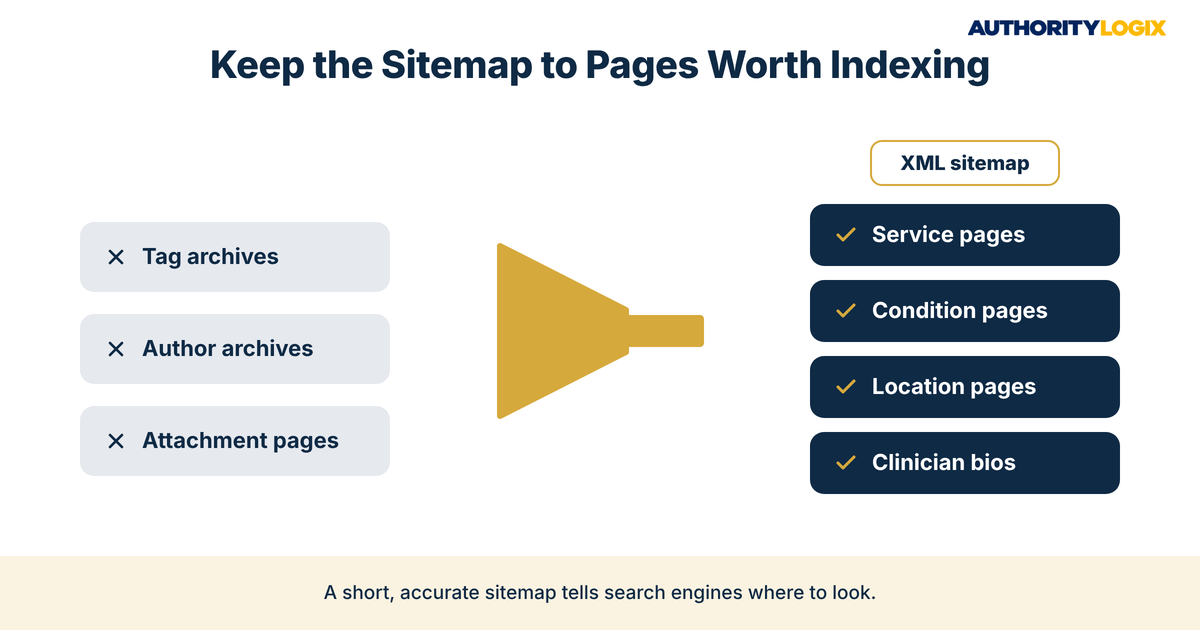
- The right WordPress XML sitemap settings keep thin tag, author and attachment pages out, so crawlers spend their time on service, condition, location and clinician pages.
- Titles, schema and local business data turn indexed pages into results patients choose, and a quarterly physical therapy WordPress SEO check keeps a redesign or plugin update from undoing the work.
Table of Contents
Why Physical Therapy WordPress SEO Often Fails at the Settings Level
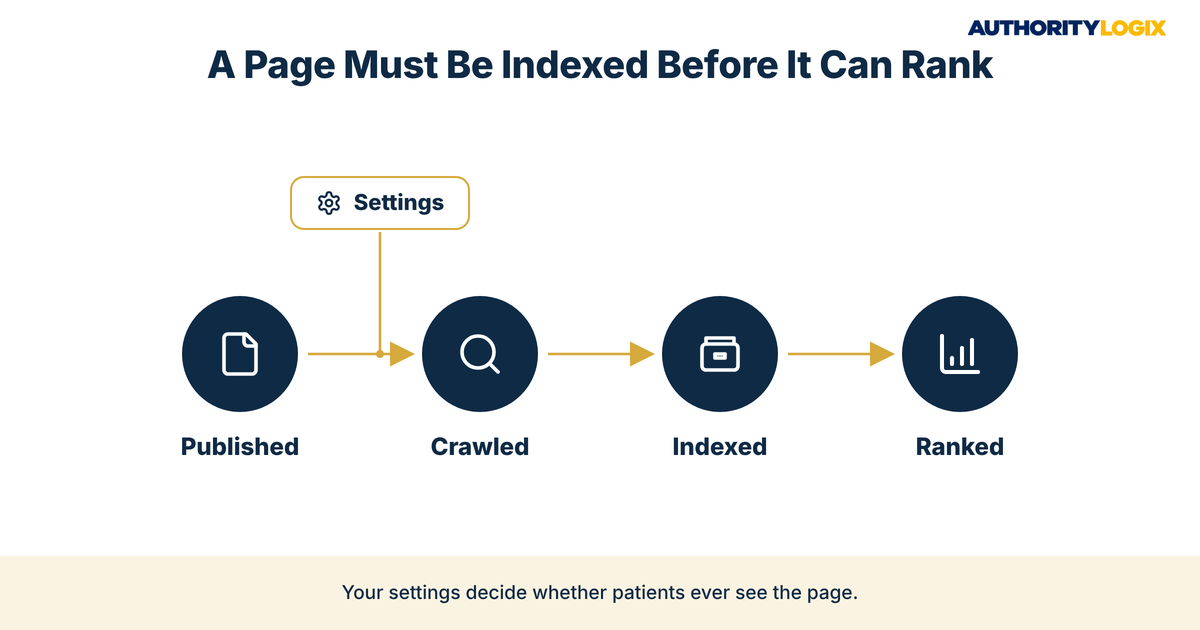
Physical therapy WordPress SEO fails most often in a place practice owners rarely look: the settings screen. You can publish excellent condition pages, clinician bios and service descriptions and still watch them sit outside Google’s index, because a checkbox, a plugin conflict or a sitemap rule tells search engines to stay away. The practice is credible. The website is simply not set up to be seen.
WordPress appeals to practices because it is flexible and easy for a front desk or marketing coordinator to update. That flexibility is also the risk, since every theme, page builder and plugin can change how pages are presented to search engines. Well-built content systems only pay off when the technical layer lets each page be crawled, indexed and ranked.
Google can only show pages it has already found, processed and stored in its index. If your physical therapy WordPress SEO setup hides your knee pain page or your location page, that search goes to a competitor whose site is simply configured correctly, and the work you put into local search has nothing to point to.
The fix is not more content; it is a configuration pass that makes sure every page you publish has a real chance to appear. Physical therapy WordPress SEO at the settings level is the foundation under every channel in your patient acquisition plan, because organic search, Google Business Profile clicks and referral checks all land on the same website.
The Physical Therapy Content SEO Playbook shows where physical therapy WordPress SEO settings fit inside a complete content and search system.
WordPress SEO Plugin Setup: The First Hour That Matters
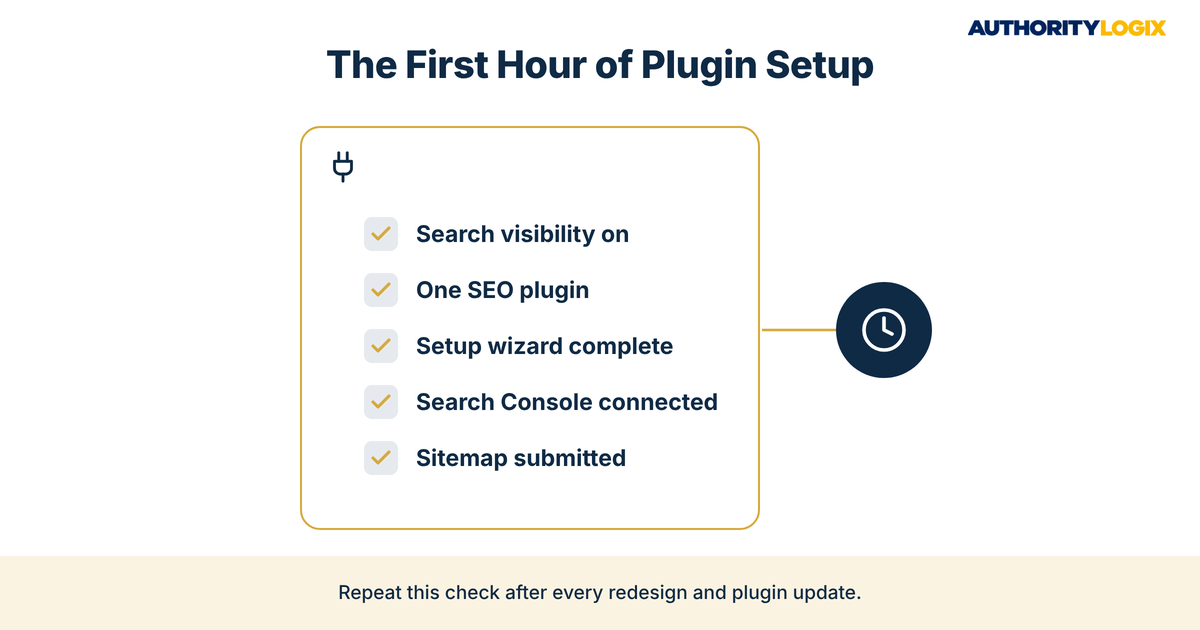
Good WordPress SEO plugin setup starts before you install anything. Open Settings, then Reading, and find the Search engine visibility section; the box labeled “Discourage search engines from indexing this site” should be unchecked on a live practice site. Bluehost explains that this setting asks search engines not to index the site, usually by adding a sitewide rule to robots.txt, and it is easy to leave on after staging.
For physical therapy WordPress SEO, choose one plugin and only one. Running Rank Math and Yoast together, or adding a second plugin just for sitemaps, invites duplicate title tags, conflicting canonical tags and competing sitemaps. Pick a plugin, run its setup wizard, and remove anything else that writes SEO metadata.
A clean physical therapy WordPress SEO setup also depends on how pages are organized. Service pages, condition pages, location pages and clinician bios should each sit under a clear parent so the plugin’s breadcrumbs and sitemap reflect a logical hierarchy, which is the job of a deliberate website structure. When the structure is messy, even perfect plugin settings produce a sitemap that confuses crawlers.
Connecting the Plugin to Google Search Console
Google Search Console is where you see whether pages are actually indexed. Rank Math’s free version includes a Search Console integration that displays key data inside WordPress, while Yoast includes webmaster tools settings for Search Console. Then submit your sitemap and use its indexing reports to see which URLs Google has indexed.
Repeat this first hour on every new site, redesign and major plugin update. It is the same discipline behind our process for practice websites: confirm visibility, keep one source of SEO metadata, connect Search Console, submit the sitemap, then check the reports to make sure your physical therapy WordPress SEO settings are doing what you expect.
Rank Math vs Yoast: Which Fits a PT Practice Better?
The Rank Math vs Yoast question comes up on almost every practice website project, and either plugin can run physical therapy WordPress SEO well. Both generate an XML sitemap automatically on install, both let you write custom titles and meta descriptions, and both control which content types appear in search. The real differences sit in what each one includes for free and how much configuration your team wants to manage.
| Physical therapy WordPress SEO task | Rank Math | Yoast SEO |
|---|---|---|
| Setup | Interactive setup wizard with Easy and Advanced modes | Setup wizard, less interactive |
| Search Console | Free integration that shows data inside WordPress | Webmaster tools settings for Search Console |
| Schema | Schema generator with templates and custom options | Basic schema elements, less customization |
| Local SEO | Free version supports local businesses; multi-location in paid plans | Local SEO sold as a premium extension |
| Redirects | Redirect manager in the free version | Automatic redirects for deleted posts in premium |
| Focus keywords | Multiple focus keywords per post in the free version | One focus keyword per post in the free version |
For a single-location practice that wants local business settings, schema options and Search Console data without paying for add-ons, Rank Math covers more of the physical therapy WordPress SEO checklist in its free version. For a practice whose team already knows Yoast, it is a stable choice, and its premium Local SEO extension adds location features. The choice matters far less than configuring it correctly and never running both.
Whichever plugin you choose, the title and description fields are where physical therapy WordPress SEO earns the click. Writing distinct, specific meta descriptions for each service and condition page is a plugin task in practice but a patient-communication task in purpose, since the snippet is the first thing a searcher reads about your clinic.
Switching later is possible, because Rank Math can import SEO settings from Yoast, but every migration needs a full check of titles, redirects and sitemap output afterward. If your team lacks time for that check, it is one of our services for practices that want physical therapy WordPress SEO handled inside a larger system rather than as a one-off fix.
WordPress XML Sitemap Settings That Get Practice Pages Indexed
Your sitemap is the list of pages you want search engines to find, and the right WordPress XML sitemap settings keep that list short, accurate and current. According to Google Search Central, all sitemap formats limit a single sitemap to 50MB uncompressed or 50,000 URLs. A PT practice will never come close, which is the point: the sitemap should be a curated list of service, condition, location and clinician pages, not every URL WordPress happens to generate.
Google also describes submitting a sitemap as merely a hint, not a guarantee that its URLs will be crawled. That is why physical therapy WordPress SEO pairs submission with monitoring. Semrush’s 2026 SEO checklist tells site owners to “submit your sitemap to GSC and Bing Webmaster Tools and add your sitemap URL to your robots.txt file.”
Sitemaps matter most for practices that publish on a schedule. Each new condition guide or patient FAQ in an educational hub should appear in the sitemap automatically and be confirmed as indexed in Search Console within a few weeks. That routine is what keeps physical therapy WordPress SEO working as the site grows.
Excluding Thin Pages From Physical Therapy WordPress SEO Sitemaps
WordPress creates archive pages for tags, authors, dates and media attachments, and most hold nothing a patient needs. In both plugins, you can set these content types not to appear in search results; Yoast explains that content set this way “will be noindexed and kept from the XML sitemap.” For most practices, tag archives, author archives for a single admin account and attachment pages are the first candidates to exclude.
Location pages are the opposite case and must stay in. A practice with several clinics needs each location page indexed and listed in the sitemap, because those pages carry its local visibility in every neighborhood it serves. Yoast also cautions that leaving a URL out of your XML sitemap does not automatically mean Google will not index it, so pages you truly want hidden need a noindex tag as well.
Not sure which of your practice pages Google has indexed? The assessment reviews your physical therapy WordPress SEO settings and shows what to fix first.
Configuring Titles, Schema, and Local Business Data
Indexing gets a page into the race; titles, schema and business data decide how it shows up. Set a title template that puts the service or condition first and the practice name and city after it, and write titles by hand for your most important pages. Physical therapy WordPress SEO at this level is about clarity, because a searcher should know from the result alone what the page covers and where the clinic is.
Schema markup tells search engines what kind of business you are. Set the site to represent an organization rather than a person, choose the most specific business type the plugin offers, and enter the name, address, phone number, hours and logo exactly as they appear on your Google Business Profile. The full approach to structured data for practices goes further, but these settings are the physical therapy WordPress SEO floor every site needs.
Article schema on condition guides helps search engines understand that your site teaches as well as sells. That matters because patient education content is often what earns the first visit from someone comparing clinics. Keep the business details identical across the plugin, your footer and directory listings, so every signal points to the same practice.
Common Physical Therapy WordPress SEO Mistakes That Block Rankings
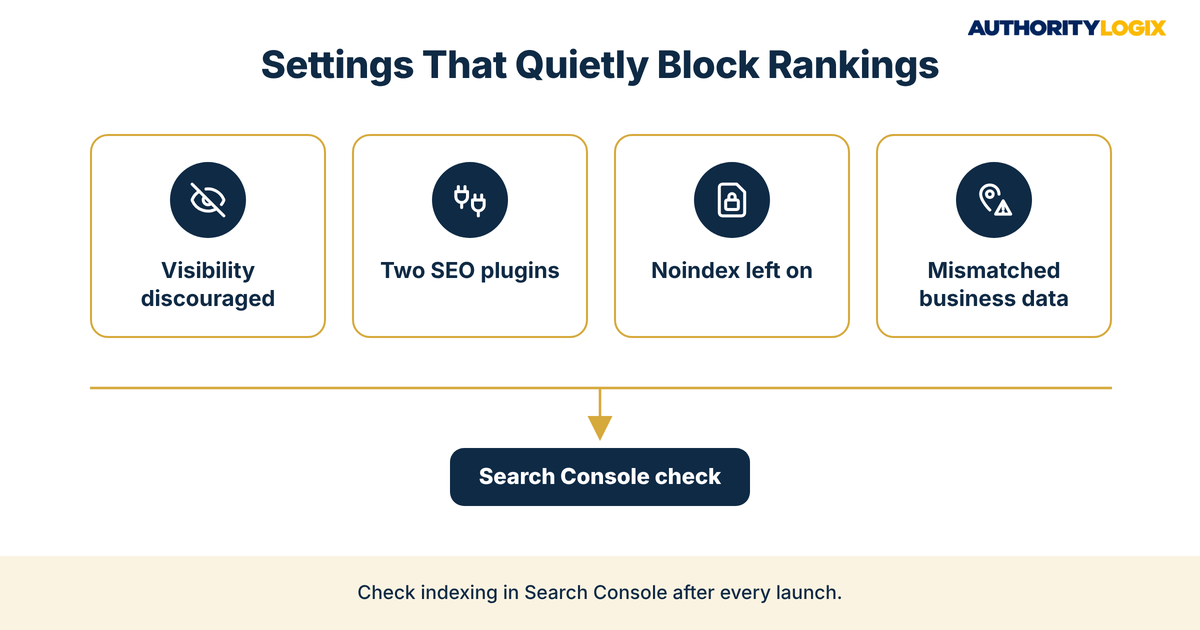
Most physical therapy WordPress SEO problems are not exotic. They come from a handful of settings that are easy to miss, and they tend to appear after a redesign, hosting move or plugin change. These are the ones to check first:
- Search engine visibility still discouraged after launch
- Two SEO plugins writing conflicting titles and canonical tags
- Service or location pages set to noindex by a page template
- Sitemaps listing redirected, deleted or thin URLs
- Location page titles that differ only by city name
- Schema business details that do not match the Google Business Profile
Noindex Tags Left On After a Redesign
Redesigns are the most common moment for physical therapy WordPress SEO to break. Staging sites are often built with search engines blocked, and those settings can survive the launch. Semrush notes that meta robots tags and X-Robots-Tag headers can block indexing even when robots.txt allows crawling, so a clean robots file is not proof that your pages are visible.
After any launch, open Search Console, inspect your top service and location URLs, and confirm each is indexable. This check protects everything built on top of the site, from the articles your team shares through authority distribution to the referral emails that send people to your pages.
A page that cannot be indexed also cannot capture a patient who finds you through search. When your lead generation forms, booking links and call buttons live on pages Google cannot see, they only serve visitors who already know your name. Fixing physical therapy WordPress SEO mistakes is how those tools reach new patients.
Frequently Asked Questions About SEO Plugins for PT Websites
Which SEO plugin is better for a physical therapy website?
Either Rank Math or Yoast can run physical therapy WordPress SEO well when it is configured correctly. Rank Math includes more local business and schema options in its free version, while Yoast offers location features through its premium Local SEO extension.
How do I know if my practice pages are indexed by Google?
Connect your site to Google Search Console and open its indexing reports. If an important page shows as not indexed, check its noindex setting, its canonical tag and whether it appears in your sitemap.
Do I need a separate sitemap plugin?
No. Both Rank Math and Yoast generate an XML sitemap automatically, and adding a separate sitemap plugin can create duplicate sitemaps. Use the sitemap built into your SEO plugin and submit that address in Search Console.
How do I exclude content from my XML sitemap?
Set the content type or the individual page not to appear in search results in your SEO plugin, which keeps it out of the sitemap and adds a noindex tag. The page types that should always stay included, such as condition and location pages, are covered across our PT resources for practice owners.
Should a small practice hire someone for physical therapy WordPress SEO?
Owners can handle the first-hour settings themselves. The ongoing work of titles, schema, content and monitoring is the part that needs a dedicated owner, and it fits best inside a broader PT marketing system rather than as a standalone technical task.
Ready to have your WordPress site configured, indexed and connected to a content system that brings direct-access patients to your service and condition pages?
Keeping Your WordPress Site Indexed and Ranked Long Term
Physical therapy WordPress SEO is not a setting you fix once. Plugin updates, new templates and theme changes can each change how a page is presented to search engines, so a short quarterly check belongs on the calendar: the visibility setting, sitemap contents, Search Console indexing, duplicate titles and schema details.
Over time, those checks become part of how a practice measures search visibility alongside reviews, referrals and booked evaluations, the approach behind the authority growth blueprint. AuthorityLogix applies the same discipline to its own proof-of-concept build, BKDSCR.com, where 18 pillar pages, 7 interactive investor tools and 48 posts all need to stay indexed to keep ranking with zero paid ads.
The honest answer is that most practices already have the clinical expertise search engines are looking for. What they lack is a physical therapy WordPress SEO setup that lets that expertise be found, which is a big part of why practices choose to have the infrastructure built once and maintained properly. Get the settings right, keep them right, and every page you publish gets a fair chance to reach the patients searching for it.