


Key Takeaways
- Physical therapy search console data shows how your practice website appears in Google Search before anyone clicks.
- Google’s Search Console Help states that the Performance report shows four metrics — clicks, impressions, CTR and average position — and that its default view covers the past three months.
- A clean Google Search Console setup, with a practice-owned account, verified property and submitted sitemap, is the foundation for every report.
- PT GSC keyword data reveals the conditions, questions and locations patients actually search, turning content planning into a working list.
- Clinic website search performance problems often surface as pages with high impressions and low clicks, or pages Google crawled but did not index.
- A monthly physical therapy search console review, owned by one person and tied to a short action list, is what turns the data into decisions.
Table of Contents
What Physical Therapy Search Console Data Shows That Analytics Can’t
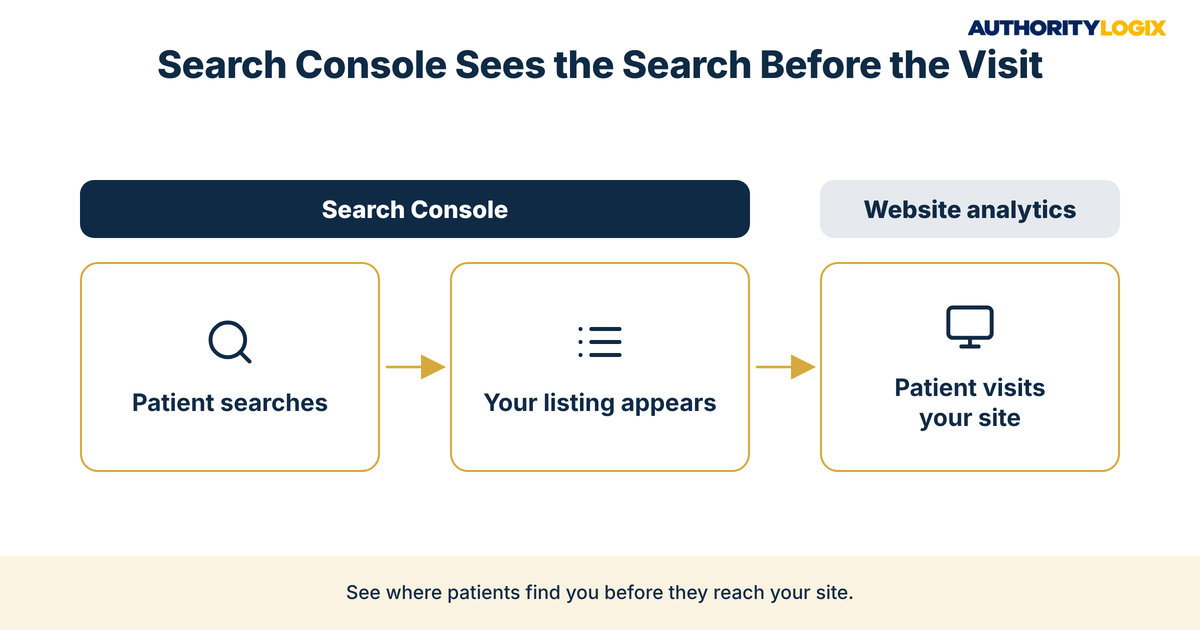
Physical therapy search console data answers a question most practice owners never get to ask: what happens before a patient reaches the website. You may have years of clinical credibility and physicians who trust your team, yet the market only sees what Google shows it. Physical therapy search console reports are Google’s own view of that moment, and they belong at the center of any serious set of content systems for a practice.
Website analytics tools are built around what visitors do once they arrive. Physical therapy search console data starts one step earlier: the searches where your practice appeared, how often it appeared, and how often someone chose your listing over the clinic beside it.
Consider how a direct-access patient finds a practice. A person with a sore shoulder types a question, scans the results and picks one practice. If your pages never appear, no amount of careful patient acquisition work further down the funnel can make up for it.
This is where being credible but invisible becomes measurable. Physical therapy search console reports show the searches where Google already treats your practice as relevant but patients are not choosing you, and they show the searches where you barely appear at all. Both gaps stay hidden without the data.
Search Console complements your Google Business Profile rather than replacing it. Map pack visibility is managed through the profile and its reviews, while physical therapy search console reports cover how the website performs in organic results. A practice that wants dependable local search visibility needs both views.
The Physical Therapy Content SEO Playbook shows how search data, keyword strategy and page architecture fit together, and where a monthly physical therapy search console review sits inside that system.
Google Search Console Setup for a PT Practice Website
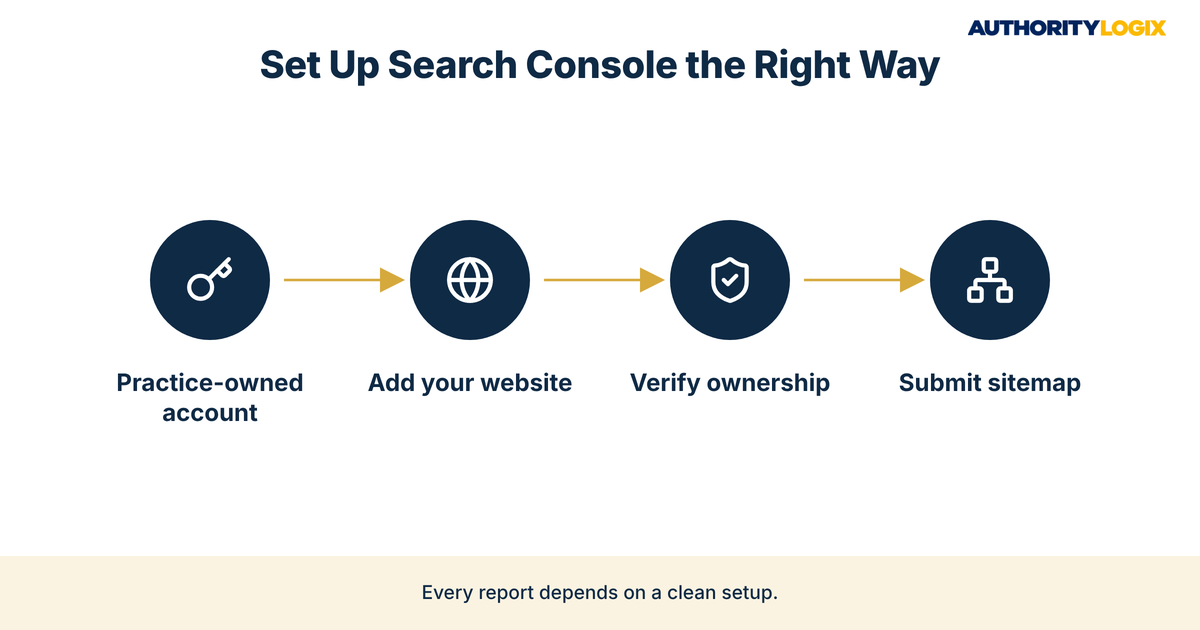
A reliable Google Search Console setup is a short job, but the details decide whether the data can be trusted. You sign in with a Google account, add the website as a property, prove you own it, and tell Google where the sitemap lives. Every physical therapy search console report afterward depends on those steps.
Decide who owns the account before anyone creates it. If a former developer set up the property under a personal email, nobody on staff may be able to log in. Creating the physical therapy search console property under a practice-owned Google account, then adding your marketing partner as a user, is part of our process for every practice website.
Verifying Your Domain and Submitting a Sitemap
Verification proves to Google that you control the website. Common methods include uploading an HTML verification file to the site, adding an HTML tag to the homepage, signing in through your domain name provider, or linking an existing Google Analytics account. Record whichever method your developer uses in the practice’s website notes.
Next, submit the sitemap. In the Sitemaps section, you enter the address of the sitemap file and select Submit, which tells Google where to find the pages you want considered. Your developer can tell you the sitemap address, and a physical therapy search console property without a sitemap starts a step behind.
Once the property is verified, confirm that its web address matches the one on your Google Business Profile and directory listings. Consistent details across every listing are part of strong local visibility, and a mismatch between versions of the address can leave you reading data for the wrong version of the site.
How to Read Physical Therapy Search Console Performance Reports
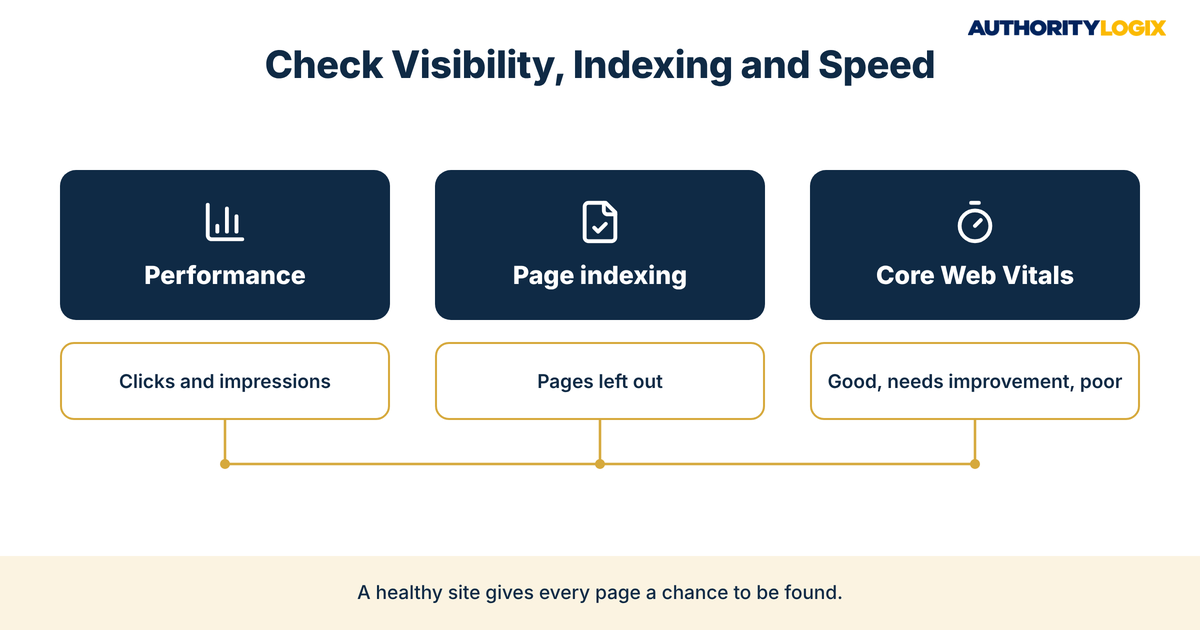
The Performance report is where most physical therapy search console work happens. Google’s Search Console Help explains that the report shows four metrics — clicks, impressions, CTR, which is the click count divided by the impression count, and average position, which is the average position of the topmost result from your site — and that its default view covers the past three months. Together they show how visible the practice is and how persuasive its listings are.
Clicks, Impressions, CTR, and Average Position in Physical Therapy Search Console
Each metric answers a different question: how often you appeared, how often someone chose you, how persuasive the listing was, and roughly where you sat on the page. Reading any one physical therapy search console metric alone leads to poor decisions, so read them side by side.
| Metric | What Google’s help page says it measures | What it tells a PT practice |
|---|---|---|
| Clicks | The number of times a user clicked your site from Google Search results | How many searchers chose your website |
| Impressions | How many times your site appeared in Search results | How visible the practice is for patient searches |
| CTR | The click count divided by the impression count | Whether your titles and descriptions persuade |
| Average position | The average position of the topmost result from your site | Roughly where your strongest page sat |
Google’s help page lists Queries, Pages, Countries, Devices, Search appearance and Dates as the tabs above the report table. For a local practice, Queries show what patients typed and Pages show which parts of the site Google chose to show them.
Google’s help page also notes that the newest data can be preliminary and might change in the next few hours. Compare complete weeks or months, such as this month against last month, rather than reacting to yesterday’s numbers.
The Queries tab is where real patient search language appears in physical therapy search console data. Look for searches that name a condition, an activity or a question, often with a town name attached. Those longer phrases are your long-tail keywords, and they describe what the patient needs in their own words.
When physical therapy search console data shows a cluster of question searches — what helps, when to see someone, what the first visit involves — it is pointing to the patient education pages that would earn a place in the results. Those questions record what future patients want explained.
Mining PT GSC Keyword Data for New Content Ideas
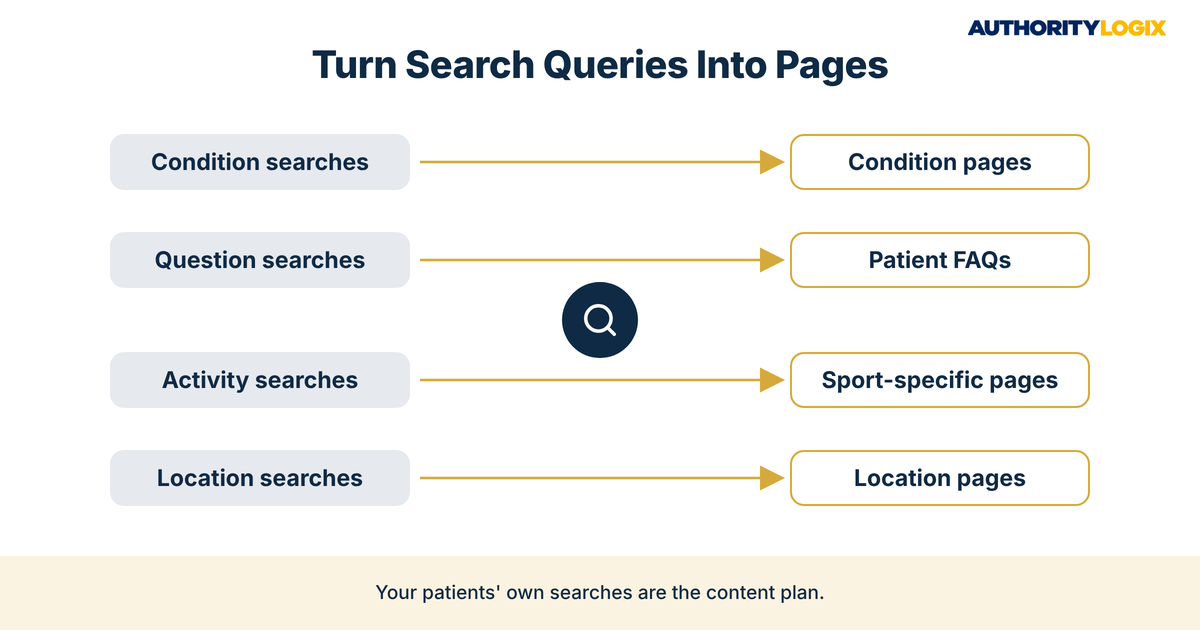
PT GSC keyword data is one of the few planning inputs that comes straight from your own future patients. Instead of guessing what to write next, you export the queries the site already appears for and sort them into groups. Each group points to a page you should strengthen or a page you have not built yet.
- Condition searches with your town — condition pages
- Question searches starting with how, what or when — FAQ answers
- Activity searches tied to running, golf or lifting — sport-specific pages
- Neighborhood searches — location page updates
- Brand searches for the practice or clinicians — a reputation signal
Start with queries where the practice appears but has no page that directly answers the search. If a physical therapy search console export shows impressions for a condition your site mentions only in a service list, that condition deserves its own page inside an educational hub that patients can browse by topic. Google is already showing you for that search, and a dedicated page gives it something worth ranking.
Sort by impressions first, then by position. Queries with steady impressions and an average position just off the first page are a natural starting point, because Google already sees some relevance. Working through PT GSC keyword data this way ties the content plan to evidence.
New pages only help when people and search engines find them. Once a page built from physical therapy search console data is live, share it through your email list and clinicians’ professional profiles, which is the job of authority distribution. Each share gives the page another path to the patients it was written for.
AuthorityLogix applies the same discipline to its own proof-of-concept build. BKDSCR.com, a DSCR real estate education platform, carries 18 pillar pages and 48 SEO-optimized blog posts built with zero paid ads, and a library that size stays useful only when someone checks which pages Google shows and for what. The industry differs; the method does not.
Not sure which searches your practice is missing, or whether Google is showing your pages for them at all? The assessment shows where your physical therapy search console data points to gaps and what to fix first.
Using Clinic Website Search Performance to Fix Underperforming Pages
Clinic website search performance varies page by page. Some pages earn clicks steadily, while others sit in the results month after month without being chosen. The Pages tab of the physical therapy search console report, sorted by impressions, shows which is which.
Spotting High-Impression, Low-Click Pages
A page with high impressions and low clicks is being shown to patients who then choose someone else. Because CTR is clicks divided by impressions, these pages stand out with a low CTR next to a healthy impression count. The cause is often the listing itself: a vague title, a generic description, or a mismatch with what the searcher wanted.
The fix is rarely a brand-new page. Rewriting the title so it names the condition and the town, writing a description that answers the searcher’s question, and tightening the opening so the page delivers on that promise is the work of content optimization, and it builds on what Google already trusts instead of starting over.
Pages that earn clicks but few evaluation requests are the other half of the picture. There, the problem sits on the page: a buried booking option or an unclear next step. Search Console shows the click, and your lead generation system decides what happens after it.
Track every change. Note the date you rewrote a title, then compare that page’s clicks and CTR in physical therapy search console data for the weeks before and after. That record shows which edits actually moved clinic website search performance.
Indexing, Coverage, and Page Experience Issues Worth Watching
A page Google has not indexed cannot appear in search results. The Page indexing report in physical therapy search console shows which pages Google can find and index on your site, and the reasons others are left out appear under “Why pages aren’t indexed.” Checking it monthly catches problems early.
One status deserves particular attention. “Crawled – currently not indexed” means Google successfully visited the page but chose not to include it in its index. For a practice, it is a prompt to ask whether the page offers something its other pages do not.
Resolving those pages is the right job for a periodic content audit. Some pages should be merged, some rewritten with genuinely local detail, and a few removed. After the fixes, use the URL Inspection tool in Search Console to request a re-crawl of each improved page.
The Core Web Vitals report covers page experience, grouping pages as good, needs improvement or poor based on metrics that measure speed, responsiveness and visual stability. A booking page in the poor group belongs at the top of your developer’s list.
None of these reports require technical skill, only the habit of opening them. A physical therapy search console check that covers indexing and page experience alongside performance keeps the website healthy enough for the rest of your PT marketing to work, from referral partner pages to direct-access campaigns.
Frequently Asked Questions About Search Console for PT Practices
What is Google Search Console, and does a PT practice need it?
It is Google’s tool for showing how your website performs in Google Search: which searches show your pages, how often, and how often people click. Any practice that wants patients to find it through search gains from physical therapy search console data, because it comes straight from Google.
What is the difference between clicks and impressions?
An impression is counted when your site appears in search results, and a click is counted when someone selects it. A page can earn many impressions and few clicks when the listing does not persuade, a theme that runs through our PT resources on page titles and descriptions.
Can Search Console show which patients visited my website?
The Performance report deals in counts — clicks, impressions, CTR and position — grouped by query, page, country, device, search appearance and date. It describes search behavior in aggregate, and turning those patterns into better pages, listings and booking paths is part of our services for practices.
Should I read Search Console reports for SEO myself if an agency manages my site?
Yes, at least once a month. Ask for access under a practice-owned account so you see the same physical therapy search console data your agency reports on, and so the data stays with the practice if the relationship ends.
Ready to turn your physical therapy search console data into a monthly system of page fixes, new condition content and listings that patients actually choose?
Building a Monthly Search Console Review Into Practice Operations
A physical therapy search console review only pays off when it happens on a schedule. Pick one day a month, assign one owner, and keep the agenda short:
- Compare clicks and impressions with the previous month
- Review the top queries and note new condition or location searches
- Flag pages with high impressions and low CTR for title rewrites
- Check the Page indexing report for newly excluded pages
- Choose one new page to build from PT GSC keyword data
Write the actions down and review them at the next meeting. Over time that record becomes the practice’s own evidence of what moves clinic website search performance, and it feeds the larger measurement plan behind long-term authority growth for the practice.
The honest assessment is that most practices already have the expertise their future patients are searching for. What is missing is a routine that shows where the website falls short, and a team that acts on it, which is why practices choose to have that routine built for them rather than squeezed into a clinic director’s week.
Physical therapy search console data will not book an evaluation on its own. It shows where patients already look for you and where they choose someone else, and practices that read it monthly close that gap deliberately.